Technical Specification
Introduction
This document provides technical specifications for Marketplace Partners integrating with Candescent Digital Banking's OIDC SSO solution. It describes the architecture, endpoints, supported features, limitations, and requirements for partner-developed solutions.
Integration Model
-
Identity Provider (IdP): Candescent Digital Banking
-
Relying Party (RP): Partner application or FI application
-
Dual-Domain Architecture:
-
Authorization Endpoint: FI's branded domain (user-facing)
-
Token Endpoint: Centralized at api.candescent.com (backend only)
-
Audience Types
This specification supports two integration audiences:
| Audience | Description | Authorization Endpoint |
|---|---|---|
| Financial Institution (FI) | Direct integration for a single institution | Single, known FI domain |
| Marketplace Partner | Fintech serving multiple FIs | Dynamic, based on originating FI |
Multi-FI Partner Integration
Marketplace Partners who offer OIDC SSO to multiple Financial Institutions must handle dynamic authorization endpoint routing. Since each FI has its own branded authorization domain, partners need to:
- Identify the originating FI when a user initiates SSO
- Route to the correct authorization endpoint for that specific FI
How Partners Identify the FI
When a user accesses your partner application via SSO, you need to determine which FI they belong to. Common methods include:
| Method | Description | Example |
|---|---|---|
| Query Parameter | FI identifier passed in the SSO launch URL | https://partner.com/sso?fi=acme_bank |
| Subdomain | FI-specific subdomain on your platform | acmebank.partner.com |
| Path Parameter | FI identifier in the URL path | https://partner.com/fi/acme_bank/sso |
| Session Context | FI determined from prior user selection | User selected FI from dropdown |
Authorization Endpoint Routing
Once you identify the FI, construct the authorization endpoint URL using the FI's specific domain:
https://<FI_DOMAIN>/usr-engage-olb/beta/v1/tpv-sso-authorize
Partner Configuration Example
Maintain a mapping of FI identifiers to their authorization domains:
{
  "fi_configurations": {
    "acme_bank": {
      "fi_id": "acme_bank",
      "fi_name": "Acme Bank",
      "authorization_domain": "online.acmebank.com",
      "authorization_endpoint": "https://online.acmebank.com/usr-engage-olb/beta/v1/tpv-sso-authorize"
    },
    "first_credit_union": {
      "fi_id": "first_credit_union",
      "fi_name": "First Credit Union",
      "authorization_domain": "banking.firstcu.org",
      "authorization_endpoint": "https://banking.firstcu.org/usr-engage-olb/beta/v1/tpv-sso-authorize"
    }
  }
}
Partner Authorization Flow
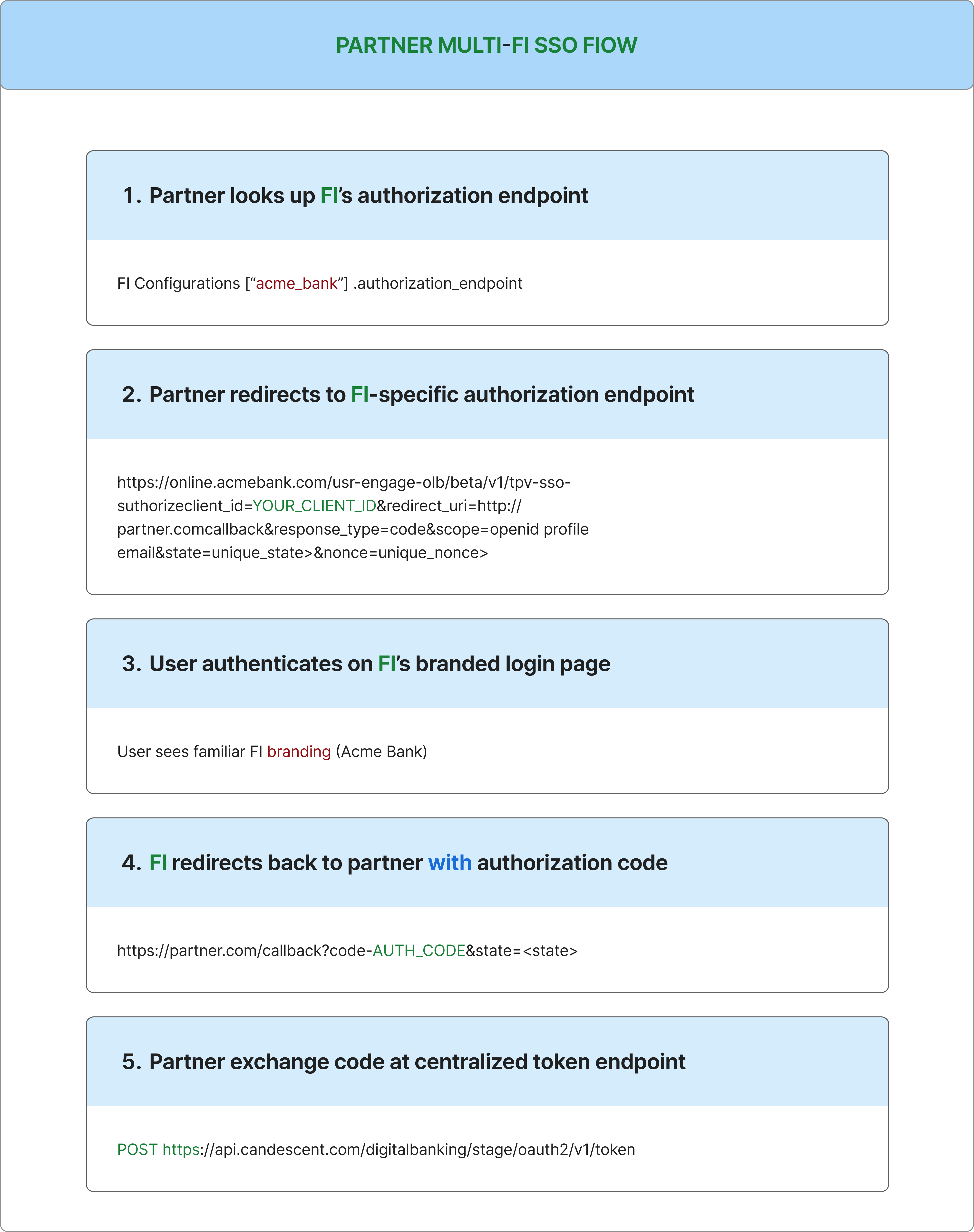
Store the FI identifier in the state parameter to maintain context through the OAuth flow. This allows you to associate the callback with the correct FI configuration.
Token Endpoint (Centralized)
Unlike authorization endpoints, the token endpoint is centralized for all FIs:
- Stage:
https://api.stage.candescent.com/oauth2/v1/token - Production:
https://api.candescent.com/oauth2/v1/token
Your partner application uses the same token endpoint regardless of which FI the user belongs to.
Token Exchange
Request
curl -X POST 'https://api.stage.candescent.com/oauth2/v1/token' \
  -H 'Authorization: Basic <base64(client_id:client_secret)>' \
  -H 'Content-Type: application/x-www-form-urlencoded' \
  -d 'grant_type=authorization_code' \
  -d 'code=<authorization_code>' \
  -d 'redirect_uri=https://yourapp.com/callback'
Response
{
  "access_token": "HhijWQlJCnAKpLqy9ScF6bYlnwOa",
  "token_type": "Bearer",
  "expires_in": 1800,
  "id_token": "eyJhbGciOiJSUzI1NiIsInR5cCI6IkpXVCJ9..."
}
Decoded ID Token Example
{
  "iss": "https://www.digitalinsight.com",
  "sub": "user_abc123",
  "exp": 1735689600,
  "iat": 1735689300,
  "nonce": "n-0S6_WzA2Mj",
  "given_name": "John",
  "family_name": "Doe",
  "email": "john.doe@example.com",
  "phone_number": "+15551234567",
  "birthday": "1990-01-15",
  "auth_time": 1735689290
}
ID Token Validation
Validate the ID token before trusting its claims:
- Verify signature using the JWKS file provided by your PM
- Check
issmatcheshttps://www.digitalinsight.com - Verify
expis in the future (token not expired) - Verify
noncematches the value you sent in the authorization request - Extract claims for user identification and profile data
Candescent ID tokens do not include an aud (audience) claim; do not expect or require audience validation.
ID tokens expire in 5 minutes. Extract and store claims immediately after validation.
Institution-users Endpoint (Optional)
While there is no standard OIDC /userinfo endpoint, Candescent provides an optional Institution-users endpoint that can be used to retrieve additional user information after authentication.
When to Use
Use this endpoint if you need additional user data beyond what's available in the ID token claims, such as:
- Additional profile information
- Account-related data
- Institution-specific user details
Request
curl -X GET 'https://api.stage.candescent.com/v1/institution-users' \
  -H 'Authorization: Bearer <access_token>' \
  -H 'Content-Type: application/json'
The userId corresponds to the sub claim from the ID token.
For complete request and response details, see the Institution-users API Reference.
Key Technical Requirements
-
Supported authentication:
client_secret_basicandclient_secret_post -
ID token expires in 5 minutes (extract claims immediately)
-
Access token expires in ~30 minutes
-
No public JWKS URI; JWKS files provided by your assigned Candescent Integration PM
-
No standard OIDC
/userinfoendpoint; all standard user claims are included in the ID token. For additional user data, see the optional Institution-users endpoint -
Only standard OIDC claims supported
Endpoint Architecture
| Endpoint Type | Domain | User Visible | Purpose |
|---|---|---|---|
| Authorization | FI Domain | Yes | User login, branding |
| Token | api.candescent.com | No | Backend token exchange |
Why Two Domains?
-
Authorization occurs on the FI domain for user trust and branding
-
Token endpoint is centralized for efficiency and security
OIDC Metadata File
The metadata file defines the endpoints and capabilities of the Identity Provider. It helps the client (FI) configure their OIDC client correctly and understand how to interact with our platform.
Replace <FI_Domain> with your institution's domain.
Sample Metadata File (Stage Environment)
{
  "issuer": "https://www.digitalinsight.com",
  "authorization_endpoint": "https://<FI_Domain>/usr-engage-olb/beta/v1/tpv-sso-authorize",
  "token_endpoint": "https://api.stage.candescent.com/oauth2/v1/token",
  "jwks_uri": "",
  "response_types_supported": ["code"],
  "subject_types_supported": ["pairwise"],
  "id_token_signing_alg_values_supported": ["RS256"],
  "scopes_supported": ["openid", "profile", "email", "phone"],
  "token_endpoint_auth_methods_supported": ["client_secret_basic", "client_secret_post"],
  "claims_supported": [
    "email",
    "exp",
    "iat",
    "iss",
    "sub",
    "birthday",
    "preferred_username",
    "given_name",
    "phone_number",
    "family_name"
  ]
}
Metadata Field Descriptions
| Field | Description |
|---|---|
issuer | The identifier for the OIDC provider |
authorization_endpoint | URL for user authentication (FI-branded domain) |
token_endpoint | URL for token exchange (centralized backend) |
jwks_uri | URL for JSON Web Key Set (provided separately by PM) |
response_types_supported | Supported OAuth 2.0 response types |
subject_types_supported | How subject identifiers are calculated |
id_token_signing_alg_values_supported | Algorithms for signing ID tokens |
scopes_supported | Available OAuth 2.0 scopes |
token_endpoint_auth_methods_supported | Client authentication methods |
claims_supported | Claims available in ID tokens |
Supported Features
-
Response Types: code only
-
Grant Types:
authorization_codeonly -
Response Modes:
query,form_post -
Scopes: openid, profile, email, phone
-
Token Authentication:
client_secret_basic(HTTP Basic) andclient_secret_post -
Subject Type: pairwise (privacy-enhanced)
-
ID Token Signing: RS256 only
Security Best Practices
-
Transport Security: TLS 1.2+ for all communications
-
Parameter Validation: State (CSRF protection) and nonce (replay protection)
-
Token Security: Extract ID token claims immediately; store access token securely
-
Credential Management: Store credentials in a secrets management system; rotate every 90 days minimum
Current Limitations
-
No public JWKS URI; JWKS files provided by your Integration PM
-
Manual JWKS update required for key rotation
-
No standard OIDC
/userinfoendpoint (as defined in the OpenID Connect Core spec); all standard claims are included in the ID token. For additional user data, the Institution-users endpoint can be used as an alternative -
No custom claims; only standard OIDC claims supported
Supported Claims
| Claim | Description | Scope Required |
|---|---|---|
| sub | Unique user identifier | openid |
| iss | Token issuer | openid |
| exp | Expiration timestamp | openid |
| iat | Issued at timestamp | openid |
| nonce | Replay protection value | openid |
| preferred_username | Display name | profile |
| given_name | First name | profile |
| family_name | Last name | profile |
| birthday | Date of birth (YYYY-MM-DD) | profile |
| Email address | ||
| phone_number | Phone number | phone |
| auth_time | Authentication timestamp | openid |
Critical Timeouts
-
Authorization code: 60–120 seconds
-
ID token: 5 minutes
-
Access token: ~30 minutes
-
Session: ≤30 minutes
Local Testing with the OIDC Toolkit
Before testing with Candescent environments, you can validate your implementation locally using the OIDC Toolkit. The toolkit simulates the complete OIDC flow with the same endpoints, claims, and token format used in production.
Quick Start
Option 1: Native Setup (Recommended for Development)
# Clone the toolkit
git clone https://github.com/candescent-dev/oidc-sso-toolkit.git
cd oidc-sso-toolkit

# Start backend (Terminal 1)
cd sample-web-app/backend
npm install
npm run start:dev  # Development mode with hot-reload

# Start frontend (Terminal 2)
cd sample-web-app/frontend
npm install
npm start  # Starts Vite dev server on port 8000

# Open http://localhost:8000
Default development certificates are included for convenience. These are safe for local testing but should not be used in production or QA environments.
Option 2: Docker (Quick Testing)
# Pull and run pre-built image
docker pull ghcr.io/candescent-dev/oidc-sso-toolkit:latest
docker run -p 8000:8000 -p 9000:9000 ghcr.io/candescent-dev/oidc-sso-toolkit:latest

# Open http://localhost:8000
If you encounter an "unauthorized" error when pulling the image, authenticate with GitHub Container Registry:
docker login ghcr.io -u YOUR_GITHUB_USERNAME
Use a GitHub Personal Access Token (PAT) with read:packages permission.
What the Toolkit Provides
| Feature | Toolkit | Production |
|---|---|---|
| Authorization endpoint | localhost:9000/api/auth/authorize | FI-specific domain |
| Token endpoint | localhost:9000/api/auth/token | api.candescent.com |
| Client credentials | Auto-generated | PM-provided |
| JWK for validation | Downloadable | PM-provided |
| ID token claims | Same as production | Same |
The toolkit generates ID tokens with identical claims to production, making it ideal for testing your token parsing and validation logic.
For complete setup instructions, see the Local Development Guide.
Testing Your Credentials
Verify your credentials are correctly configured by making a test token request:
# Generate Base64 credentials
echo -n "your_client_id:your_client_secret" | base64

# Test authentication (use an invalid code to test credentials only)
curl -X POST 'https://api.stage.candescent.com/oauth2/v1/token' \
  -H 'Authorization: Basic <base64_credentials>' \
  -H 'Content-Type: application/x-www-form-urlencoded' \
  -d 'grant_type=authorization_code&code=TEST'
| Response | Meaning |
|---|---|
invalid_grant | ✅ Credentials valid, code was invalid (expected) |
invalid_client | ❌ Credentials incorrect |
Python Implementation
A complete Flask implementation for the OIDC callback handler:
import json
import secrets
import base64
import requests
from flask import Flask, redirect, request, session, url_for
from jwcrypto import jwk, jwt

app = Flask(__name__)
app.secret_key = secrets.token_hex(32)

# Configuration - replace with your values
CLIENT_ID = "your_client_id"
CLIENT_SECRET = "your_client_secret"
REDIRECT_URI = "https://yourapp.com/callback"
TOKEN_ENDPOINT = "https://api.stage.candescent.com/oauth2/v1/token"
ISSUER = "https://www.digitalinsight.com"

# Load JWKS from file provided by your PM
with open("jwks.json") as f:
    JWKS = jwk.JWKSet.from_json(f.read())

@app.route("/login")
def login():
    """Redirect user to FI authorization endpoint."""
    state = secrets.token_urlsafe(32)
    nonce = secrets.token_urlsafe(32)
    session["oauth_state"] = state
    session["oauth_nonce"] = nonce

    # Get FI-specific authorization endpoint (from your configuration)
    auth_endpoint = "https://online.acmebank.com/usr-engage-olb/beta/v1/tpv-sso-authorize"

    params = {
        "client_id": CLIENT_ID,
        "redirect_uri": REDIRECT_URI,
        "response_type": "code",
        "scope": "openid profile email",
        "state": state,
        "nonce": nonce
    }
    return redirect(f"{auth_endpoint}?{'&'.join(f'{k}={v}' for k, v in params.items())}")

@app.route("/callback")
def callback():
    """Handle the authorization callback."""
    # Validate state
    if request.args.get("state") != session.get("oauth_state"):
        return "State mismatch", 400

    code = request.args.get("code")
    if not code:
        return "Missing authorization code", 400

    # Exchange code for tokens
    credentials = base64.b64encode(f"{CLIENT_ID}:{CLIENT_SECRET}".encode()).decode()
    response = requests.post(
        TOKEN_ENDPOINT,
        headers={
            "Authorization": f"Basic {credentials}",
            "Content-Type": "application/x-www-form-urlencoded"
        },
        data={
            "grant_type": "authorization_code",
            "code": code,
            "redirect_uri": REDIRECT_URI
        }
    )

    if not response.ok:
        return f"Token exchange failed: {response.text}", 400

    tokens = response.json()
    id_token = tokens["id_token"]

    # Validate and decode ID token
    try:
        token = jwt.JWT(key=JWKS, jwt=id_token)
        claims = json.loads(token.claims)

        # Validate claims
        if claims["iss"] != ISSUER:
            return "Invalid issuer", 400
        if claims["nonce"] != session.get("oauth_nonce"):
            return "Invalid nonce", 400

        # Store user info in session
        session["user"] = {
            "sub": claims["sub"],
            "name": f"{claims.get('given_name', '')} {claims.get('family_name', '')}",
            "email": claims.get("email")
        }
        return redirect(url_for("dashboard"))

    except Exception as e:
        return f"Token validation failed: {e}", 400

@app.route("/dashboard")
def dashboard():
    if "user" not in session:
        return redirect(url_for("login"))
    return f"Welcome, {session['user']['name']}!"
Required packages:
pip install flask requests jwcrypto
Troubleshooting & Support
-
Invalid
redirect_uri: Ensure exact match and HTTPS -
State validation failed: Store and validate state parameter
-
Authorization code expired: Exchange immediately (60–120 seconds)
-
Client authentication failed: Verify credentials encoding
-
Token signature validation fails: Ensure correct JWKS file and environment
-
JWKS key rotation: PM will notify and provide updated files
For questions or support, contact your assigned Candescent Integration PM.